
In the fast-paced LNG market, timing is everything. A sudden diversion or an unexpected delay can have million-dollar implications for spot contracts. The Events section acts as an intelligent control tower, automatically notifying you of operational anomalies.
1. Detection Mechanisms: How It Works
Orbify uses two primary triggers to identify when a vessel is deviating from its planned path:
AIS Diversion: The system detects when a vessel officially updates its destination in its AIS signal (e.g., changing from one port to another).
Geospatial Diversion: The system identifies physical movement anomalies, such as a vessel changing direction or "turning back" without a signal update.
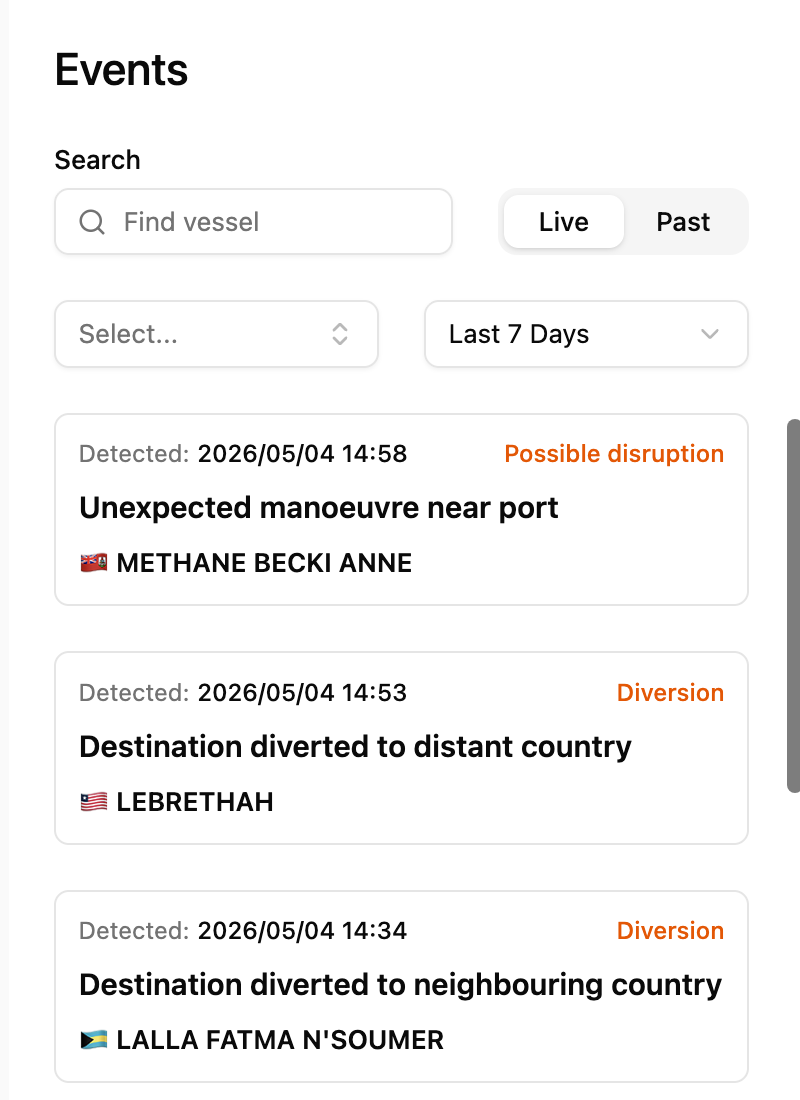
2. Navigating the Events Hub
The interface is designed for rapid response and historical auditing:
Live vs. Past: Toggle between ongoing incidents and historical events to analyze regional congestion trends.
Smart Filters: Search by Vessel Name or filter by event type, including Diversion, Possible Disruption, Departure, Arrival, or Stationary Movement.
Time Scales: View alerts from Today, the Last 7 Days, or the Last 30 Days to put current events into a broader context.
3. Interpreting an Event: Deep-Dive Analysis
When you click on a specific alert, such as an Unexpected Manoeuvre, Orbify provides a granular breakdown to help you verify the threat level:
Description & Confidence: The system describes the movement (e.g., "Sharp turn close to a terminal") and assigns a Confidence Level. A "Low" confidence might indicate routine berthing, while "High" indicates a confirmed disruption.
Voyage Map: A dedicated map highlights the exact coordinates where the anomaly was detected.
Integrated Performance Graph: By overlaying Speed and Draught, you can visually confirm if a ship has stopped (speed drops to zero) while remaining fully loaded (constant draught).
This article focuses on the Events section of Orbify—a proactive "early-warning system" that transforms raw AIS data into actionable notifications for logistics and trading teams.
4. Automation: Manage Events & Custom Alerts
You don't need to monitor the screen 24/7 to stay ahead of the market. Through the Manage Events feature, you can automate your workflow:
Email Notifications: Opt to receive immediate alerts for Disruptions, Diversions, or Stationary Movements.
Custom Events: Create tailored triggers for specific vessels or sensitive geographic zones, ensuring you only receive the data that matters most to your strategy.
The Competitive Edge
The Events section shifts your team from a reactive to a proactive stance. Knowing a vessel has diverted the moment it happens allows you to renegotiate contracts, alert receiving terminals, or secure replacement cargoes before the rest of the market reacts.